WeAM Shorts: Videos, Social
- 4.7
- Rating
- 100.00K
- Installs
- Free
- Price

 Analysis by App-foxy
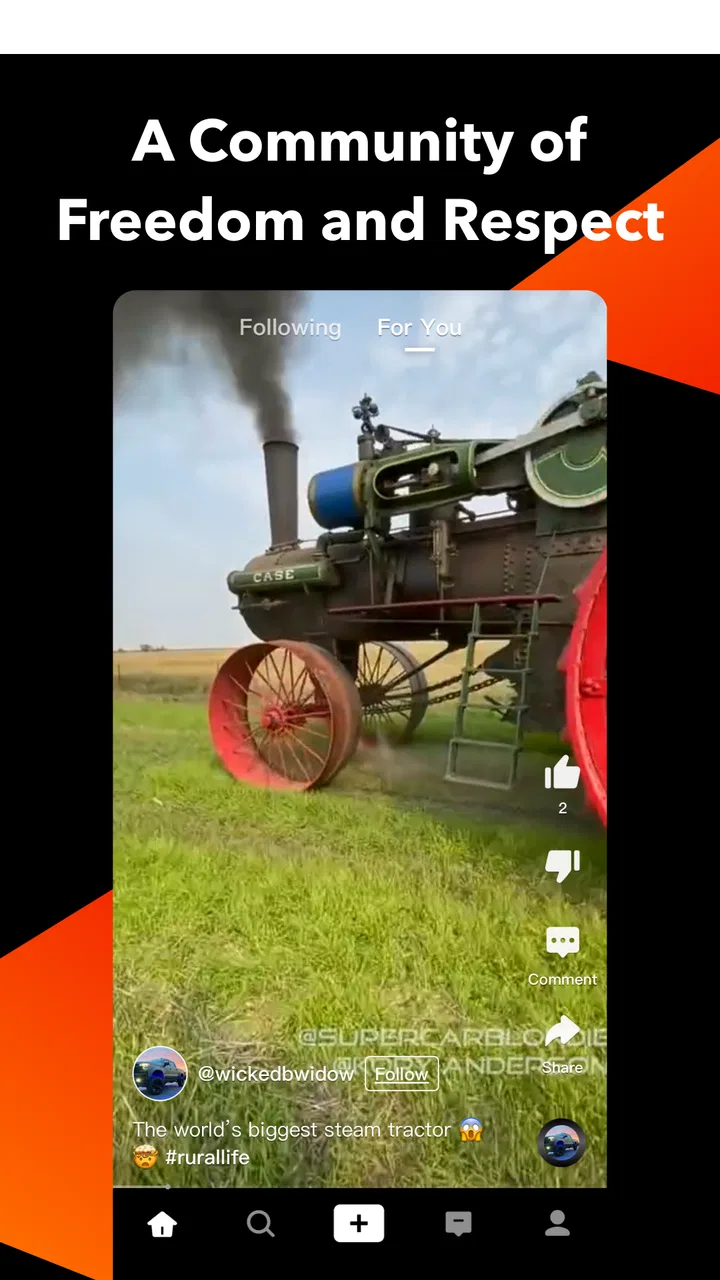
I approached WeAM Shorts: Videos, Social as an entertainment app for quick browsing, conversation, and everyday updates rather than as a replacement for a full news service or a dedicated messaging platform. Its short store summary, “Real news, life and chat,” points to that mix, and after spending time with the app, I found that its appeal depends heavily on how comfortable you are with switching between brief video content and social interaction.
The first thing I would tell a friend is to keep expectations realistic. This is a compact, fast-moving experience, not a carefully organized magazine. It works best when you want to dip in for a few minutes, see what is being discussed, and decide which clips or conversations deserve more attention. If you prefer long articles, deep search tools, or a strictly chronological feed, the format may feel loose. If you enjoy discovering information through short pieces and reacting in the same place, it has a more natural fit.
What the app is trying to combine
WeAM Shorts sits in the entertainment category, although its subject matter can reach beyond simple amusement. The combination of news, lifestyle material, video, and chat makes the experience feel broader than a standard short-video feed. I found that breadth useful when I wanted a casual overview of what people were watching and discussing, but it also created the app’s central challenge: different kinds of content invite different expectations.
You May Also Like

 Blood Strike: 2.5 Anniversary
Blood Strike’s Loadouts Turn Every Drop Into a Tactical Gamble
A close look at Blood Strike’s custom loadouts: how fast access to signature weapons reshapes its battle royale rhythm, rewards preparation, and narrows the gap between fights.

 Pandora - Music & Podcasts
Pandora’s Music Is Easy to Start, but Harder to Recover
Pandora’s strength is its low-effort path from a seed to a station. Its weak spot is how much confidence it asks you to place in connection, setup, and quiet recovery.

 8 Ball Pool
8 Ball Pool Is Built on Rivalries, Rematches, and Routine
A close look at the rivalries, rematches, shared routines, and unanswered safety questions that turn a quick pool match into a persistent mobile community.

 Samsung Music
Samsung Music’s Quiet Strength Is Playing What You Already Own
Its reach comes less from spectacle than from dependable access to a personal library. That simplicity is both the app’s strongest retention engine and its ceiling.

 AccuWeather: Weather Radar
AccuWeather Review: A Quick, Clear Forecast for Everyday Decisions
For everyday plans, the best forecast is the one you can understand quickly. AccuWeather makes rain timing, radar, and local conditions easy to act on, with a few trade-offs.

 Hill Climb Racing
Why Hill Climb Racing Still Turns Crashes Into One More Run
A tiny car, a bumpy hill and one more upgrade: Hill Climb Racing keeps resurfacing because its simple chaos makes every near-miss feel personal.
More From Our News Desk



A short clip is easy to consume, while a news item may require context. A chat interaction asks for attention and judgment that a passive video does not. Moving between those modes can be convenient, but it means I had to treat the app as a discovery layer rather than my only source for important information. For serious topics, I would still check the original reporting or a more established news reader before acting on what I saw.
The app is free to download, which makes experimenting with it straightforward. It is marked for mature audiences, so I would not install it on a child’s device or assume that every topic and conversation will be suitable for younger users. Optional purchases range from $0.99 to $99.99 per item, so I would review purchase controls before handing over a phone to someone else, especially if the device is shared.
Where new users are most likely to get stuck
The most common friction is not necessarily a broken function. It is the uncertainty that comes from an app combining several purposes. A person opening it for “news” may expect sections, headlines, and clear source trails. Someone arriving for short videos may expect an endless, highly personalized stream. A person looking for chat may expect conversations to be the main focus. When those expectations collide, the first session can feel less obvious than the simple description suggests.
I recommend giving the opening screen a few minutes before deciding that the app is confusing. Look at how content is grouped, notice which controls appear consistently, and avoid tapping through quickly just because the first few items are not exactly what you wanted. Short-form feeds often learn from what you watch or skip, but I would not assume that every preference changes instantly. A deliberate first session usually gives a better impression than random swiping.
Another point of friction is context. A short video can present a claim, opinion, or personal experience without giving you enough background to judge it immediately. That is not unique to this app, but the mixture of “real news” and social material makes it especially important here. I treat clips as prompts for further checking, not as automatic confirmation. That habit improves the experience and prevents the feed from becoming the sole basis for a decision.
Chat can introduce a different kind of hesitation. A public or social conversation may move faster than a new user expects, and written comments can be easy to misunderstand. I would avoid sharing personal details early, keep replies brief until I understand the tone of a space, and use the available in-app controls if a conversation becomes uncomfortable. The app’s mature age classification is a useful reminder that social participation calls for more care than simply watching a clip.
Setup checks that save time
Before troubleshooting anything, I would begin with the basics: confirm that the device runs a compatible operating system, make sure the app has been installed from the official platform, and check that the connection is stable. The minimum requirement is Android 7.0 or later, so an older Android phone may be the reason installation or updating fails. On a supported device, a weak connection can still make video loading look like an application problem.
I also recommend checking available storage and leaving enough room for normal app updates. Short-video services can feel unreliable when a phone is nearly full, even if the app itself opens. Closing other demanding apps, restarting the device, and trying again on a dependable Wi-Fi connection are sensible first steps. These are simple checks, but they separate a local device issue from a problem that affects the service more broadly.
When I set up an entertainment app with social elements, I review notification choices rather than accepting every prompt automatically. Notifications can be useful for conversations, but too many alerts can make the app feel intrusive and encourage unnecessary checking. I prefer to keep only the notifications that support an actual reason for using the app, such as replies or activity I intentionally follow.
Account details deserve the same attention. I would use a recovery method I can access, choose a password that is not reused elsewhere, and avoid entering sensitive information into a chat simply because the conversation feels friendly. If the app presents purchase options, I would also check the device’s authentication settings. The free entry point is appealing, but the presence of in-app items means a little preparation can prevent an accidental charge.
One practical setup tip is to test the app in two locations: first on a reliable home connection and then on the mobile network you normally use. If video works in one place but not the other, the problem is probably connectivity, network restrictions, or signal quality rather than the installation. That small comparison is more useful than repeatedly reinstalling the app without changing the conditions.
Recovering a stalled workflow
When a clip refuses to load, I would avoid performing several changes at once. Start by waiting briefly, then move between Wi-Fi and mobile data if both are available. Restart the app only after noting whether other apps can reach the internet. If everything else is also slow, the feed is unlikely to be the real cause. If the rest of the phone works normally, closing and reopening the app is a reasonable next step.
If the app opens but a particular interaction does not respond, I would return to the main screen and try a different item. This helps identify whether the issue is tied to one piece of content or to the whole session. A single stalled clip can be a temporary content or connection problem; a completely unresponsive interface points more toward the device, the installation, or a broader service interruption.
Updates can also matter. The current version is 3.6.2, and keeping the installation current is worthwhile when an issue appears after a platform update or when a function behaves differently from earlier sessions. I would update through the normal app store, restart the device afterward, and test again before attempting more disruptive steps. If the problem began immediately after an update, recording exactly what changed is useful when contacting support.
Reinstalling should be a later option, not the automatic answer. It can clear local problems, but it may also remove locally stored session information and force you to sign in again. Before doing it, I would make sure I know the account recovery details and remember any preferences that may need to be restored. If the issue is caused by network conditions or a service-side interruption, reinstalling will not solve it.
For chat-related trouble, I would first distinguish between sending failure, delayed delivery, and a conversation that has simply gone quiet. A message that does not appear at all may suggest a connection or session problem. A message that appears later may reflect delay rather than data loss. I would avoid repeatedly sending the same text, since that can create duplicates and make a confusing conversation harder to follow.
When the app is not the cause
It is easy to blame the application when the real issue is the phone. Older hardware, aggressive battery management, limited storage, background data restrictions, and unstable mobile coverage can all affect a video-heavy social experience. If the app freezes only when several other apps are open, I would close those first. If playback improves after charging the phone or disabling a restrictive battery mode, the device was probably limiting performance.
Network filtering can be another explanation. A workplace, school, hotel, or public Wi-Fi network may handle video and social traffic differently from a home connection. I would not assume that a failed load means the account is damaged. Testing a trusted alternative network is a safer diagnostic step than changing account settings at random.
Content availability and personal expectations can also be mistaken for technical faults. A feed that does not immediately show a preferred topic may simply need more interaction, or the available material may not match the user’s interests at that moment. I would spend a little time observing the feed before concluding that personalization is failing. At the same time, I would not force myself to use an app whose content mix consistently feels irrelevant.
Privacy and social boundaries are not technical problems either. If the chat side feels too exposed, the answer may be to change how you participate, limit what you share, or stop using that part of the service. No entertainment app is worth ignoring uncomfortable interactions. The mature rating makes this especially important for families deciding whether the app belongs on a shared device.
Useful ways to fit WeAM Shorts into daily life
My favorite realistic use case is a short break between tasks. I might open the app while waiting for an appointment, watch a few clips, read the surrounding reactions, and leave once I have a quick sense of what is catching people’s attention. The key is to treat that session as a bounded check-in. Without a stopping point, short content can turn a five-minute pause into a much longer distraction.
A second use is conversational discovery. If a topic catches my attention, I can use the social side to see how other people respond rather than consuming the clip in isolation. That can add human context, but it also creates a trade-off: comments may be lively without being reliable. I find the strongest workflow is to use discussion for questions and perspectives, then verify important claims elsewhere.
For someone who follows lifestyle content, the app may work as a source of ideas rather than a structured planner. I would save the useful parts outside the feed in whatever personal system I already trust, because a fast-moving stream is not the same as an organized reference library. This is one of the less obvious trade-offs: discovery is convenient, but retrieval later may be less comfortable than it is in a dedicated notes, bookmarking, or news application.
I would also separate viewing from chatting when I need concentration. Watching a few clips and then responding to messages can become a loop that is difficult to exit. A practical habit is to decide in advance whether the session is for browsing or conversation. That small boundary makes the app feel more intentional and reduces the chance that notifications dictate the entire visit.
How it compares with familiar alternatives
Compared with a traditional news reader, WeAM Shorts is more immediate and social, but less suitable for building a complete, carefully organized picture of an event. A news reader usually wins when I want sections, saved articles, source comparison, and deliberate reading. WeAM Shorts is more appealing when I want quick visual discovery and a sense of what people are discussing right now.
Compared with a dedicated short-video platform, its broader news-and-chat identity is the main distinction. A specialized video service may offer a more refined viewing loop or a larger set of creator-focused tools, while this app’s attraction is the attempt to place clips and social exchange closer together. If your only goal is polished entertainment videos, a dedicated alternative may feel more focused. If you want entertainment mixed with everyday discussion, the wider scope may be useful.
Compared with a messaging app, the social experience here should not automatically be treated as a private conversation space. A messaging service is generally the better choice for direct communication with people you know and for conversations where privacy and continuity matter. I see WeAM Shorts as better suited to lightweight reactions and discovery around content, not as the place I would move every important conversation.
That comparison also explains who should skip it. I would not recommend it to someone who dislikes algorithmic browsing, wants only verified long-form reporting, or needs a distraction-free communication tool. I would also hesitate to suggest it to a younger user because of the mature age classification. On the other hand, adults who enjoy short clips, casual social exchange, and a mixed entertainment feed may find the combination more convenient than maintaining several separate apps.
What the numbers suggest, and what they do not
The app has reached over 100K installs and holds a 4.7 average from around 582 ratings, with 65 written reviews. Those figures suggest that the early audience has responded positively, but I would not use them as proof that every device or every content preference will suit the experience. Ratings are helpful as a starting signal; they cannot replace testing the app on your own phone and judging whether its feed and conversations match your habits.
VELEGEND PTE. LTD. is the developer behind the app, and the current release is 3.6.2. I appreciate seeing an actively identified version because it gives users something concrete to compare when troubleshooting. If you report a problem, include the device type, operating system, connection used, and the exact step that failed. That is much more useful than saying only that the app is broken.
The release date is Dec 30, 2025, which also helps frame the product as relatively new in its current form. Newer apps can change quickly, so a feature’s placement or behavior may evolve between updates. I would avoid building an elaborate personal workflow around one control until I am comfortable that the overall experience is stable for my needs.
My practical verdict
I enjoyed WeAM Shorts most when I used it as a quick discovery and conversation app, not as an all-purpose replacement for news, video, and messaging services. Its strongest idea is the combination of real-world topics, short visual content, and social reaction in one place. That can make a brief break feel more varied than opening a single-purpose app.
The trade-off is that variety brings ambiguity. You need to judge context, manage your attention, and separate technical problems from network or device problems. Setup is simple enough on a compatible phone, but I would still check the operating system, connection, storage, notification choices, and purchase authentication before settling into regular use.
My recommendation is conditional but positive: adults who like fast, mixed-format entertainment should try it, especially if they want conversation alongside clips. Use it with sensible privacy habits, verify important news away from the feed, and give yourself a clear stopping point. If you need deep reporting, private messaging, or a tightly organized video library, choose a more specialized alternative instead. For the right user, this free entertainment app has a useful place in the daily routine; for everyone else, its mixed purpose may feel like more friction than convenience.
FAQs for WeAM Shorts: Videos, Social
01What is WeAM Shorts: Videos, Social, and what can you do with it?
WeAM Shorts: Videos, Social is a short-video platform designed for discovering, watching, and sharing quick vertical clips. After installing it, users can browse a personalized feed, interact with videos, and potentially follow creators or connect with other members of the community. The experience is focused on fast entertainment and social engagement, although the available content and features may vary by region and app version.
02Is WeAM Shorts: Videos, Social free to download and use?
The app can generally be downloaded without an upfront purchase, allowing users to explore its main video and social features at no initial cost. However, free access may include advertising, optional purchases, or other monetized elements depending on the version available in your country. It is worth checking the app-store listing and payment settings before downloading, especially if the device is used by children.
03Does WeAM Shorts: Videos, Social require an account?
Some content may be viewable immediately after opening the application, but creating an account is usually more useful for receiving personalized recommendations, following creators, saving interactions, and participating in the social side of the platform. Registration may require information such as an email address, phone number, or third-party login. Before signing up, review the permissions and privacy policy so you understand how your information is handled.
04Can users upload their own videos and interact with other people?
WeAM Shorts: Videos, Social is built around community participation, so users may be able to publish short videos, react to posts, leave comments, share clips, and follow other accounts. The exact tools available can depend on account status, age restrictions, moderation rules, and the current app release. Anyone planning to upload content should check the platform guidelines and avoid sharing private information, copyrighted material, or videos involving people without permission.
05Is WeAM Shorts: Videos, Social safe and suitable for children?
The app may contain user-generated videos, comments, advertising, and recommendations that are not appropriate for every age group. Parents should review the official age rating, privacy options, content controls, and account requirements before allowing a child to use it. It is also advisable to enable device-level parental controls, discuss responsible sharing, and monitor interactions, since social video platforms can expose users to unwanted contact or unsuitable content.
Pros
- Quick
- swipe-based browsing makes discovering short videos effortless.
- Social features encourage interaction through likes
- comments
- and sharing.
- Personalized content can improve as you watch and engage with videos.
- Short clips are convenient for quick entertainment during spare moments.
- A creator-focused platform offers opportunities to reach a niche audience.
Cons
- Content quality may vary widely between creators and uploads.
- Frequent short-video scrolling can become distracting or time-consuming.
- The available audience may be smaller than on established video platforms.
- Personalized recommendations require viewing activity and user interaction.
- Video playback and uploads can consume mobile data quickly.

WeAM Shorts: Videos, Social
Gallery